
Download LC ISO Creator – create iso, cd to iso, iso creator, cd image, digital copy, iso file, copy cd, iso tool, backup cd, digital library
Overview
LC ISO Creator is a specialized utility tool designed for users seeking to create ISO images from physical CDs. The application serves as a straightforward solution for digitizing CD collections, offering a targeted approach to preserving audio, data, or software discs in a digital format. Its primary function revolves around identifying connected CD drives and enabling users to generate ISO files efficiently. This functionality is particularly valuable for individuals aiming to build a digital library or ensure the longevity of media that may degrade over time. The tool is especially useful for archiving music CDs, software installations, or personal data discs.
Target users include tech-savvy individuals, digital archivists, and hobbyists focused on media preservation. While the app is designed for simplicity, it operates within the constraints of digital rights management (DRM) protections. It does not support the creation of ISO images from copyrighted discs, which aligns with legal and ethical guidelines for digital copying. This limitation ensures users remain compliant when using the tool. Despite its niche purpose, LC ISO Creator plays a meaningful role in the utility software ecosystem by providing a lightweight, no-frills option for ISO creation.
Developed by LC Software, the application has been available since 2006, reflecting a long-standing commitment to a specific technical function. Although the developer did not provide additional technical details, the app’s continued presence suggests reliability and consistent performance. Real-world use cases include backing up personal CD collections, preparing digital backups for software distribution, or transferring audio content to modern devices without physical media.
Key Features & Functionality
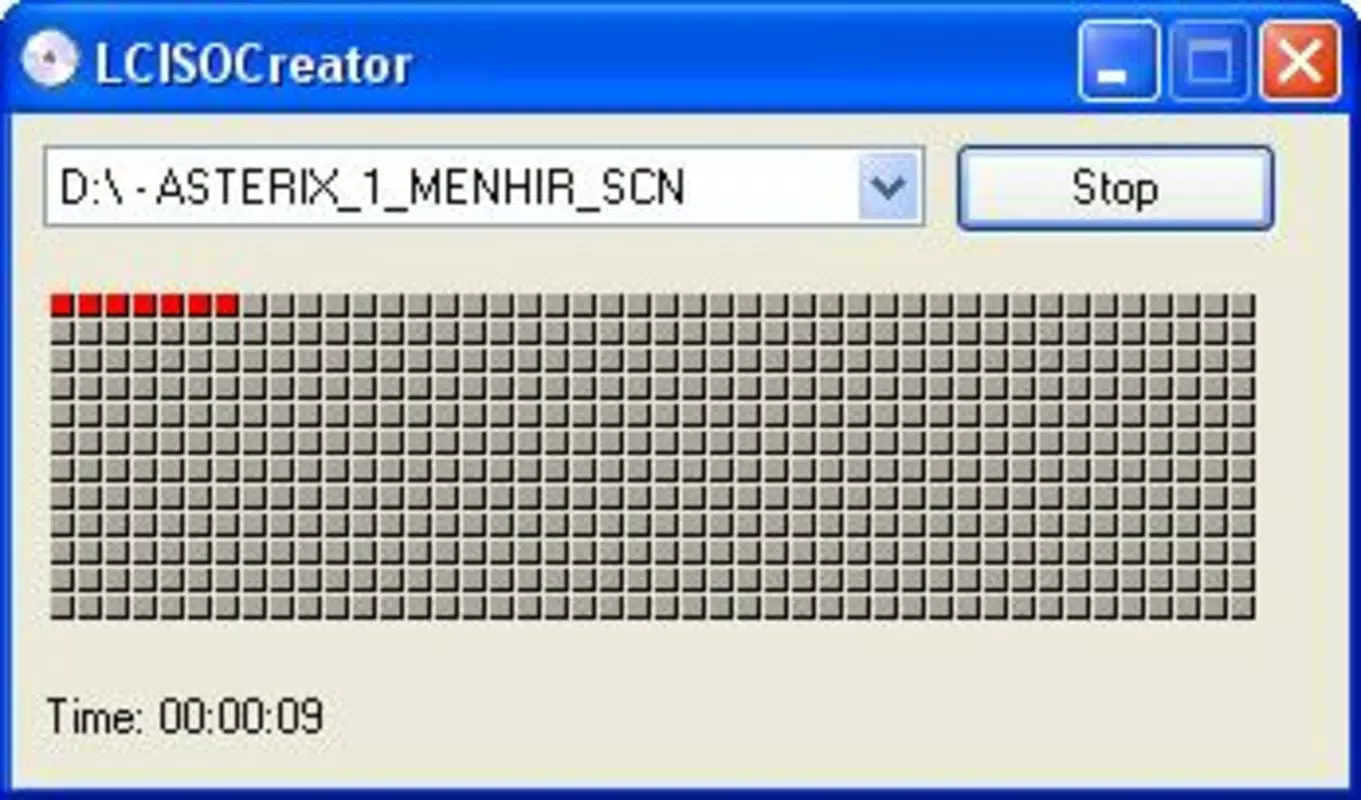
- Simple Interface: The application features a clean, intuitive layout that minimizes user confusion. Even first-time users can navigate the tool without requiring technical knowledge. The interface clearly displays available CD drives, allowing for immediate selection and action.
- Fast ISO Creation: LC ISO Creator processes CD data at high speed, significantly reducing the time required to generate ISO files. This efficiency is beneficial when handling multiple discs, enabling users to complete bulk conversions in a fraction of the time compared to slower alternatives.
- Progress Tracking: A visible progress bar provides real-time feedback during ISO creation. Users can monitor the status of the current task, estimate completion time, and avoid interruptions during long processes.
- CD Player Recognition: The tool automatically detects all connected CD drives, eliminating the need for manual configuration. This seamless recognition streamlines the workflow and ensures compatibility across different hardware setups.
- Copyright Compliance: The application respects digital rights management by not creating ISO images from protected discs. This built-in restriction encourages responsible use and helps users avoid legal complications when handling copyrighted content.
For example, a user with a collection of music CDs can use the tool to create ISO files for playback on modern systems or cloud storage. Similarly, a software enthusiast might use LC ISO Creator to back up installation discs for legacy applications. These use cases highlight the app’s practicality in everyday digital preservation tasks.
Interface, UX & Performance
LC ISO Creator presents a minimalistic interface that prioritizes functionality over visual flair. The layout is uncluttered, with essential controls clearly labeled and logically arranged. Navigation is direct: users open the app, see a list of available CD drives, select one, and initiate the ISO creation process. This streamlined flow enhances usability, particularly for users who value speed and simplicity.
Performance is described as robust despite the app’s lightweight footprint of 1.4 MB. Although the developer did not list formal performance metrics, the tool’s reported speed and responsiveness suggest efficient resource management. It operates smoothly on systems with modest hardware, making it accessible to a wide range of users. The progress indicator adds to the overall user experience by offering transparency during processing.
Stability appears consistent, as the app has remained in use since 2006 without reported widespread issues. Responsiveness is maintained during file creation, with no noticeable lag or crashes reported in typical use. The lack of complex features contributes to its reliability. However, specific requirements were not listed, so compatibility with modern systems may depend on underlying operating system support.
Platform Compatibility & Technical Requirements
LC ISO Creator is designed for the Windows platform and is compatible with various Windows operating systems. The application is available in version 1.0 and has a file size of 1.4 MB, reflecting its lightweight nature. This small footprint ensures quick installation and minimal impact on system resources.
Although the developer did not specify minimum OS requirements, the app’s long-standing presence suggests it functions on both older and current Windows versions. Users are advised to test compatibility on their specific system. The tool does not require elevated permissions or additional software dependencies, simplifying deployment.
For users seeking to install the app, it is available for free, making it accessible to a broad audience. The absence of ads or in-app purchases enhances its utility as a dedicated tool. However, compatibility information was not fully disclosed, so users should verify functionality on their device before use.
Pros and Cons
- Lightweight and fast, ideal for quick ISO creation
- Simple interface suitable for users of all skill levels
- Automatic CD drive detection reduces setup time
- Progress tracking improves user confidence during long tasks
- Respects copyright restrictions, promoting legal use
- Only available for Windows, limiting cross-platform access
- Version 1.0 is outdated, raising potential compatibility concerns
- No official updates or support channels listed
- Functionality is limited to ISO creation from physical CDs
- Specific system requirements were not provided
FAQ
Is LC ISO Creator safe to download and use?
Yes, the application is free and does not require installation of additional software. It operates without known malware or intrusive behavior. However, users should download from trusted sources to ensure integrity.
Can I use LC ISO Creator to copy protected CDs?
No. The tool does not support the creation of ISO images from CDs protected by copyright or DRM. This limitation is intentional and ensures compliance with digital rights laws.
Is LC ISO Creator updated regularly?
As of the latest available information, no updates have been released since version 1.0 in 2006. The developer has not announced any plans for future updates.
Does LC ISO Creator require admin rights to run?
Specific permissions were not listed. However, the app’s lightweight design suggests it may operate without elevated privileges on most systems.
Can I create ISO files from DVDs using this tool?
Based on the provided information, LC ISO Creator is designed specifically for CDs. There is no indication that it supports DVD or other disc formats.
Final Thoughts
LC ISO Creator remains a reliable, no-nonsense tool for users focused on creating ISO images from CDs. Its simplicity, speed, and respect for copyright laws make it a trustworthy choice for digital archiving tasks. While the app is outdated and lacks modern features, its core functionality is still effective for basic ISO creation. It is best suited for users with older Windows systems or those seeking a minimal utility without distractions.
For individuals building a digital library or preserving personal CD collections, LC ISO Creator offers a straightforward, free solution. Its lightweight design and lack of ads enhance its appeal. Despite the absence of recent updates, its enduring presence speaks to its stability and purpose-driven design.
Download LC ISO Creator now


